Making eclipse launch scripts or How to make your own Gradle Eclipse Plugin
Everybody that has worked with eclipse knows that one of the strengths of eclipse, beside being free, is its plugin-system. However it can also become its biggest downside when you have to wrestle with a configuration that requires different versions to work together.
In the past I have even used multiple eclipse versions side by side to avoid plugin conflicts.
Gradling Eclipse
Nowadays I spend a significant amount of time with eclipse and gradle.
The support for writing gradle build scripts in eclipse is minimal to say the least. The official buildship plugin still has to mature before it will be truly useful. At the very least it comes at no additional cost as it will become an integral part of eclipse starting from Mars.
I am using the groovy plugin for eclipse to help me with the bare groovy syntax of writing groovy functions and launch scripts to offer a curated set of build tasks. Those build tasks can be anything, not just gradle tasks.
The (gradle) wrapper
When using gradle, the recommended way is to put the actual gradle tool, also called wrapper, inside your project and commit it to the versioning system. This way you don't need to install any tools on the system which comes in handy on special environments like your CI-Server.
Wizards
Once gradle is part of your system you can work with it from the command line by calling ./gradlew yourTask.
This can become a bit cumbersome and that's why I use eclipse launch scripts. They are little more than an xml configuration that tells eclipse how to start programs. Creating them from scratch is not that fun but eclipse comes with a wizard to simplify the process.
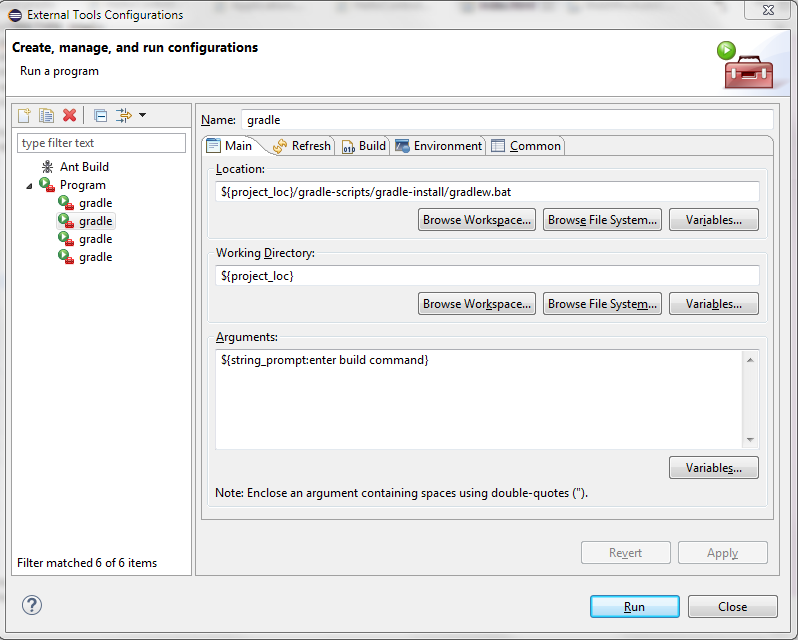
It is even possible to use variables as part of the configuration. Here we use the command prompt as input to execute any task using the project's gradle wrapper.
The export
From the export menu File->Export or your regional equivalent you can select the launch scripts that you want to export.
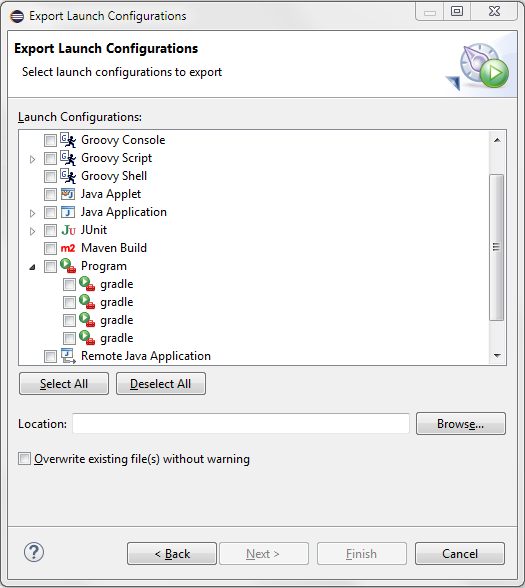
I usually create a gradle folder that contains the wrapper along with some handy scripts. Those can be checked in and allow anybody to simply execute them without having to exit eclipse and type commands in a command prompt.
The most used script is probably the Refresh Eclipse.launch which simply executes the following gradle tasks:
cleanEclipse eclipse
This will remove all artifacts that gradle created for eclipse such as .project and .classpath files. Then it recreates them. It will not clean your gradle output directory nor run a compile through gradle but it will download all necessary dependencies for eclipse to build it.
If you run into problems with stale versions e.g. SNAPSHOTS then try but be aware that since the cache is invalidated it will take longer.
cleanEclipse eclipse --refresh-dependencies
And that's it, now you can customize your eclipse installation with little groovy helpers :)